Cross-subscription load balancer
Azure Load Balancer supports cross-subscription load balancing, where the frontend IP and backend pool instances can be in different subscriptions from the Azure Load Balancer. This article provides an overview of cross-subscription load balancing with Azure Load Balancer, and the scenarios it suppo
01 Jul 2022, 07:49 UTC
Azure Load Balancer supports cross-subscription load balancing, where the frontend IP and backend pool instances can be in different subscriptions from the Azure Load Balancer.
This article provides an overview of cross-subscription load balancing with Azure Load Balancer, and the scenarios it supports.
What is cross-subscription load balancing?
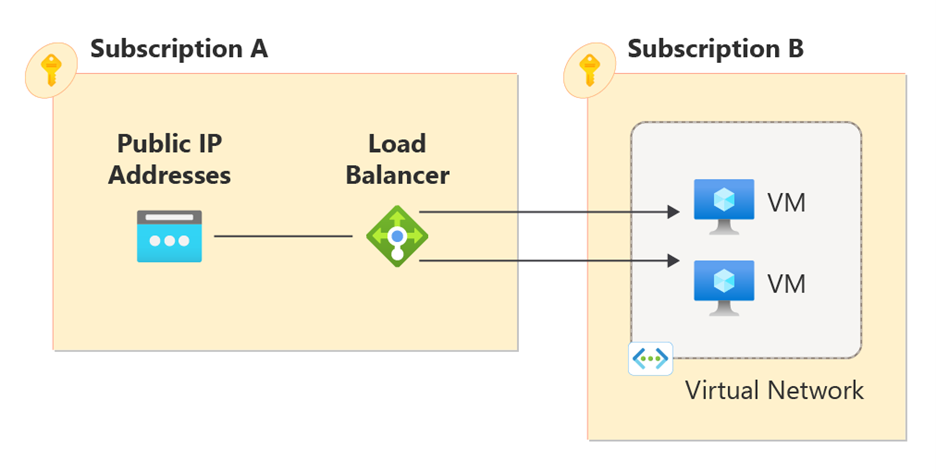
Cross-subscription load balancing allows you to deploy Azure Load Balancer resources across multiple subscriptions. This feature enables you to deploy a load balancer in one subscription and have the frontend IP and backend pool instances in a different subscription. This capability is useful for organizations that have separate subscriptions for networking and application resources.
This table illustrates some of the possible scenarios cross-subscription load balancing supports.
| Subscription 1 | Subscription 2 |
|---|---|
| Load Balancer | Backend pool resources and Frontend IP address |
| Load Balancer and Backend pool resources | Frontend IP address |
| Load Balancer and Frontend IP address | Backend pool resources |
Cross-subscription frontend IP configurations
Cross-subscription frontends allow the frontend IP configuration to reside in a different subscription other than the load balancer’s subscription. To enable cross-subscription frontend IP configurations, all backend pools need to have the SyncMode property configured.
Public frontend IP configurations
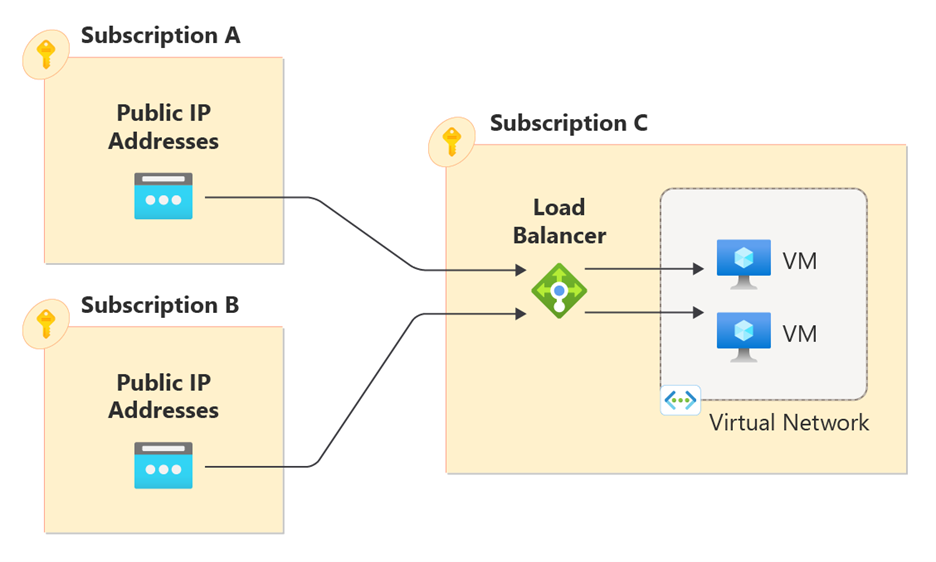
Public IP addresses used by an Azure Load Balancer can reside in different subscription than the load balancer. If you attach multiple public IP addresses to a load balancer, each IP address can come from a different subscription. For example, if you have a Load Balancer (deployed in subscription C) with two frontend IPs, the first IP address can reside in subscription B and the second IP address can reside in subscription A.
Open diagram: Screenshot of public frontend IP configuration with cross-subscription load balancing.
You can't change the subscription for a frontend IP configuration after you set it. However, you can update the frontend IP configuration with a different IP address within the same subscription. For example, if a frontend IP configuration is attached to IP address A in subscription 1, you can update it to IP address B also in subscription 1. Cross-subscription public IP addresses are only supported on the regional tier standard load balancer.
Internal frontend IP configurations
Like public load balancers, internal load balancers can also have cross-subscription frontend IP configurations. In this case, the subnet and virtual network can reside in a different subscription than the load balancer. However, unlike public frontends, all internal frontend configurations must come from the same subnet and virtual network. Furthermore, all backend pools must be configured to the same virtual network as the frontend IP configurations.
Cross-subscription backend pools
Cross-subscription backends allow backend instances to reside in a different subscription other than the load balancer’s subscription. For example, the load balancer could be in subscription 1 and my backend VMs could be located in subscription 2. The backend instances and the virtual network they refer to can be located in a different subscription. Cross-subscription backend pools must utilize a new property known as SyncMode.
What is SyncMode
The SyncMode property is a parameter that you can specify when you create a backend pool by using IP addresses and virtual network IDs. You must set this property when using cross-subscription frontends or backends. It has two possible values: Automatic or Manual.
In addition, this property replaces the concept of NIC-based or IP-based backend pools. As a result, backend pools with the SyncMode property configured are a distinct type of backend pool, separate from NIC or IP-based backend pools. Backend pools can either be exclusively NIC-based, IP-based, or SyncMode enabled.
When should I use Automatic SyncMode
When you configure SyncMode as Automatic, you synchronize backend pool instances with the load balancer configuration. As a result, changes to the backend pool instances automatically reflect in the load balancer’s backend pool configuration. This change is relevant when using virtual machine scale sets in the backend pool. When the scale set scales in or out, the backend pool members are automatically added or removed from the pool accordingly. Like NIC (network interface cards) based backend pools, if you set SyncMode to Automatic, each backend instance’s NIC must also reference the load balancer backend pool. As a result, you add backend instances to Automatic SyncMode backend pools by updating the NIC resource’s reference to the load balancer.
When should I use Manual SyncMode
When you configure SyncMode as Manual, backend pool instances aren't synchronized with the load balancer configuration. This mode allows you to create a backend pool with pre-provisioned private IP addresses that you can use for scenarios such as disaster recovery, active-passive, or dynamic provisioning. When using Manual SyncMode backend pools, you're responsible for updating the backend pool when any changes to your backend instances occur, such as with a scale set autoscaling.
Cross-subscription Global Load Balancer
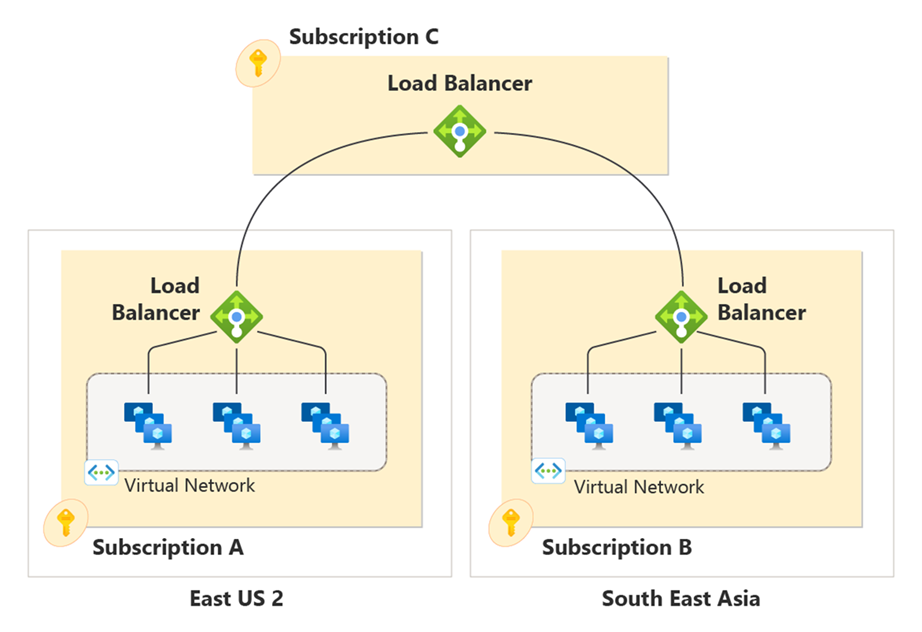
In addition, Azure global Load Balancer supports cross-subscription load balancing. By using cross-subscription global load balancer, backend regional load balancers can each be located in different subscriptions. Cross-subscription backends on a global load balancer don't need other parameters or changes to the backend pool.
Open diagram: Screenshot of cross-subscription global load balancer concept.
Note
Cross-subscription frontends aren't supported on Azure global Load Balancer today.
Authorization
To enable cross-subscription load balancing, assign the Network Contributor role or a custom role with the appropriate actions listed in the following table to the user on both subscriptions:
Cross-subscription Frontends
Public Frontends
Microsoft.Network/loadBalancers/frontendIPConfigurations/join/actionMicrosoft.Network/publicIPAddresses/join/action
Internal Frontends
Microsoft.Network/loadBalancers/frontendIPConfigurations/join/action
Cross-subscription Backends
Microsoft.Network/loadBalancers/backendAddressPools/writeMicrosoft.Network/loadBalancers/backendAddressPools/join/actionMicrosoft.Network/virtualNetworks/writeMicrosoft.Network/networkInterfaces/write
Cross-tenant
When working cross-tenant, assign the Network Contributor role or a custom role with the appropriate actions for cross-subscription frontends in both subscriptions. For more information about cross-tenant linkage, see Authenticate requests across tenants.
Limitations
- You can't set
SyncModeon a backend pool that already has backend addresses. If you try to set it, you get the errorSyncModePropertyCannotBetSetWithLoadBalancerBackendAddressesPresent. In practice, you must configureSyncModebefore adding backend addresses to the pool.- You must explicitly set the
SyncModeproperty – by default, theSyncModeproperty is unspecified.
- You must explicitly set the
- You need to use API version 2023-04-01 or later to deploy or update the load balancers.
- You can't change the
SyncModeproperty on a backend pool after you set it. - You must specify a virtual network when you configure the
SyncModeproperty. You can't update the virtual network on the backend pool after you set it. - Inbound NAT pools aren't supported for cross-subscription load balancers. Use inbound NAT rules instead.
- You must deploy all resources in the same region as the load balancer.
- The
SyncModeproperty isn't supported on cross-region load balancer backend pools. - You can't chain cross-subscription load balancers to Gateway Load Balancers.
- Gateway Load Balancers can't have cross-subscription components.
 azure
azure